 Chillar
Your spends.
Your phone.
Only you.
Chillar reads the order, ride, bill and subscription receipts in your Gmail and shows what you spend online. It all happens on your phone.
For Android. iPhone coming soon.
- No servers
- No account
- Read-only Gmail
- No ads or tracking
Your receipts, added up.
Most of what you spend online arrives as an email receipt. Chillar finds those receipts and adds them up for you.
Link your Gmail
Sign in with Google and allow read-only access. Chillar can't send, delete or change your mail.
It finds your receipts
Orders, rides, bills, subscriptions and bank payment alerts are read on your phone.
See where it went
Totals by day, category and platform, plus fees, habits and budgets.
Every spend, sorted.
One place for the money that leaves in small amounts, across many apps.
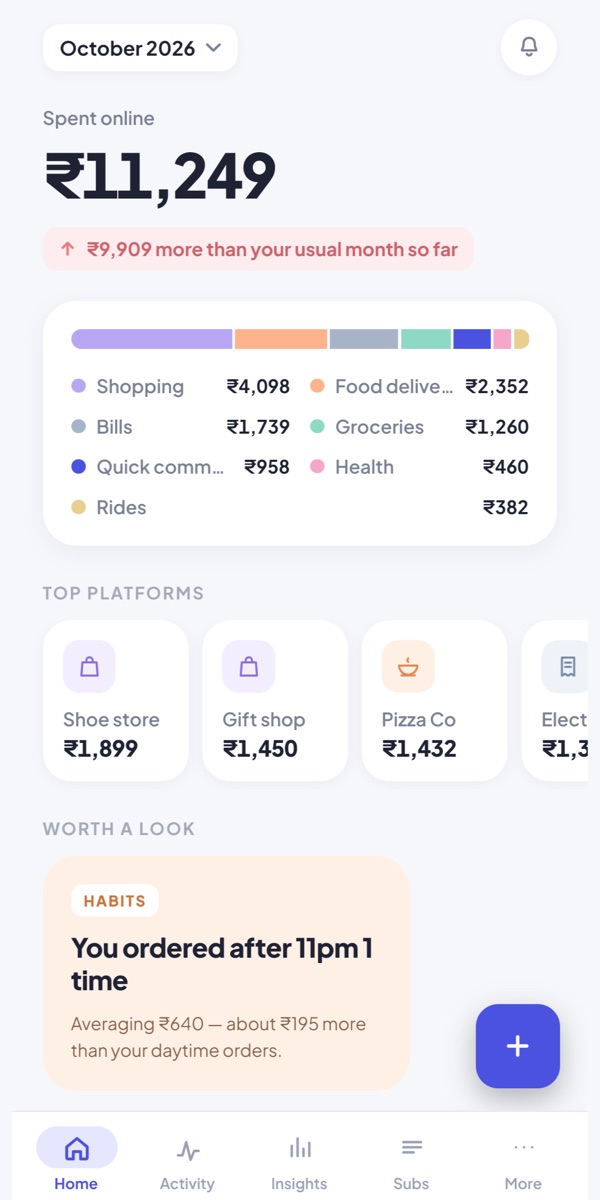
This month at a glance.
Open the app and see what you've spent online this month, split by category and by platform.
- Month total with a by-category bar
- Your top platforms
- "Worth a look" cards for habits that add up
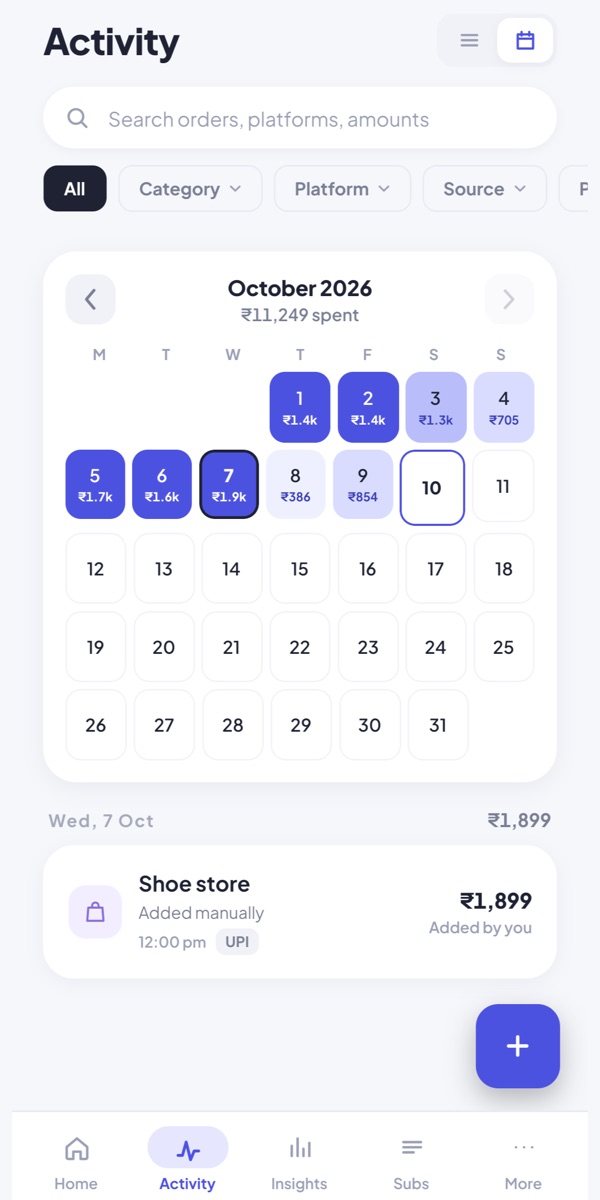
Every day, on a calendar.
See what you spent on each day of the month and tap a day for the details.
- Search orders, platforms and amounts
- Filter by category, platform or source
- Add cash or offline spends by hand
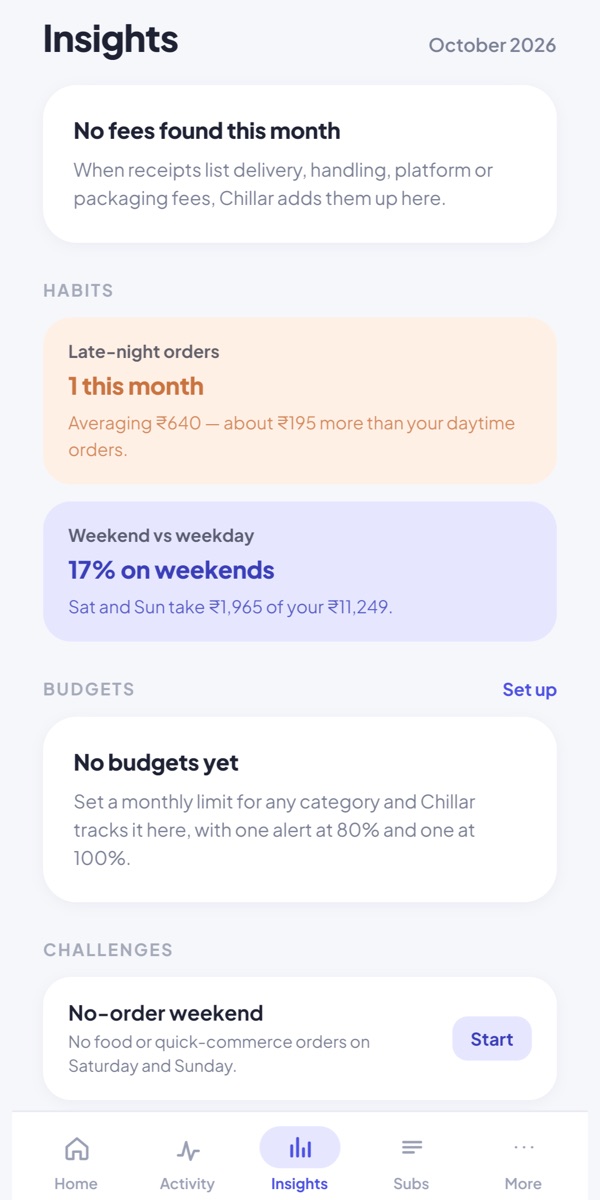
The patterns behind the total.
Chillar points out the habits that cost you, so you can decide what to change.
- Delivery, handling, platform and packaging fees, added up
- Late-night orders and weekend vs weekday spending
- Challenges like a no-order weekend
Subscriptions
Your subscriptions in one tab, with renewal dates and price changes.
Budgets
Set a monthly limit for any category. You get one alert at 80% and one at 100%.
Privacy centre
What is read, what is never read and where it is stored. Pause reading or delete everything from here.
What Chillar doesn't have.
Chillar was built so that nobody else can see your spending, including us.
Where the app connects: Google, to sign you in and read your mail, and GitHub, to download two public files (the reading rules and the daily nudges). Those downloads send nothing about you. A file leaves the app only when you choose to export a CSV, send feedback or share a reading log.
From scattered emails to a clear month.
Every order, ride and bill sits somewhere in your inbox. Chillar brings them together on your phone, without sending them anywhere.
Questions, answered.
Straight answers about what Chillar reads and where it goes.
What does Chillar read?
Order, invoice, payment, refund and subscription emails from shopping, food delivery, ride and subscription services, plus debit and card payment alerts from banks. Messages are found by sender and subject. From each one, Chillar takes the merchant, amount, fees, items, payment method and date.
It doesn't read mail from anyone else, such as personal messages, work threads or newsletters, and never asks for attachments or contacts. It reads rupee amounts and works best with Indian services and banks.
Is my data uploaded anywhere?
No. Chillar has no servers. Everything it reads is processed and stored in an encrypted database on your phone. The body of an email isn't stored; when you tap "View receipt", the original is fetched from Gmail and shown on screen.
Can Chillar send, delete or change my email?
No. It asks Google for read-only access (gmail.readonly), which can't send, delete or change mail.
How do I delete everything or revoke access?
In the app, go to More, then Privacy centre, then Delete everything. That unlinks every account and erases the database. You can also unlink a single Gmail account or pause reading. Uninstalling the app removes all of its data too.
You can revoke Chillar's access to your Google account at any time at myaccount.google.com/permissions.
Is there an iPhone version?
Not yet. Chillar is on Android now, and iPhone is coming soon.
What if a receipt isn't recognised?
Let us know from the app. Use More, then Send feedback, or share the reading log from More, then Reading health. The reading log masks names, addresses, phone numbers, email addresses and order, card and account numbers, and the app shows you the whole file before you share it. It's used only to fix reading problems.
You can also add a spend by hand from the Activity screen.
Can I link more than one Gmail account?
Yes. You can link several Gmail accounts and unlink any of them at any time.
How Chillar uses Google data
When you link a Gmail account, Chillar requests the read-only Gmail permission (gmail.readonly). It cannot send, delete or change mail. Chillar uses this permission only to:
- search your mailbox, on your phone, for order, invoice, payment, refund and subscription emails and bank payment alerts;
- extract the merchant, amount, fees, items, payment method and date to show you your own spending;
- show you the original email when you tap "View receipt".
Your Gmail data is processed and stored only on your device. It is never sent to the developer or any third party, never used for advertising, and never read by a person.
Chillar's use of information received from Google APIs adheres to the Google API Services User Data Policy, including the Limited Use requirements.
You can unlink an account or delete everything from inside the app at any time, and revoke access at myaccount.google.com/permissions. Full details are in the privacy policy.